top of page
CARNIVAL PANORAMA SHIP TOUR
I'll give you a ship tour...at least the pictures that I did get around the ship. I always seem to get home and wonder how I missed things. Of course it's usually the places we visited often so therefore I say to myself "We'll be back and I'll get them then" then never do. Oops!
Deck 3: Vista Restaurant


Deck 4: Atrium


Guest Services:

The desk to book your excursions:

Computers for those that need to get on the internet, don't have your own with you or a phone.

Deck 4 Heros Bar: always had sports going on in here

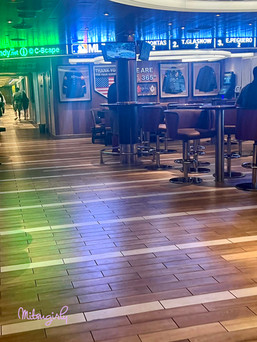


Limelight Lounge: Where they have all the comedian shows here and always crowded and definitely not enough room for everyone.


Panorama Casino: They even had one of those glow thingymabob's in there too that you could see from the floor above. There was a glass around it so no smoke smell filtering up to this deck.


DECK 5:
Alchemy Bar


Bonsai Sushi


Bonsai Teppanyaki: We did see them having a fire/flame in here during the "performance". I thought that was odd because I'm pretty sure that NCL stopped doing the fire due to hazard.

Cherry On Top


For those that need to get your duck on...they had duck everything. Carnival is cashing in on the duck hunting experience now.


Fahrenheit 555


Just a few of the Fun Shops. They were always having "sales" of course with tables out in the hallways


Piano Bar


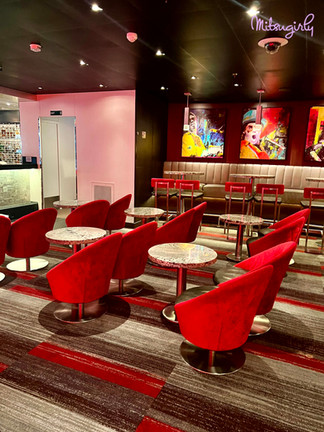


Guys Pig & Anchor (I must have really liked this place because I managed to get a lot of pictures there)


Havana Bar


Pixels where you can buy all your pictures during the cruise, have a professional session and purchase items like electronics, a GoPro and even a snorkel mask to attach your GoPro too (trust me, I considered it but after thinking about it, it's attached to the top of the mask and usually when snorkeling, that part is up out of the water....so what would you be getting video of? Hmmm...am I right or no?)


Then there are seating area's that you could look at your pictures on the screens there as well.

The Library where you can read or play games: (as you can see...we spent some time in there. Sakari is concentrating hard here)


Deck 7: Sky Zone


Deck 10: Beach Pool This is the pool in the middle of the ship. The above decks on the end have the Waterworks and slides.


The back of the pool is the Tides Pool and hot tubs

The Seafood Shack is also located on the back of the ship by the Tides Pool. You have to pay to eat here and it is a la carte. But, you can get drinks at the station here including coffee in the mornings


On the other side is the Pizzeria del Capitano

Deck 11
Cucina del Capitano: You can eat here for free during lunch on sea days


Ji Ji Asian Kitchen: You can also eat here for free during lunch on sea days


Deck 12: The Clubhouse and Sports Square


Just a few odd's and ends around the ship


WELCOME TO 2024!! Where nothing is as it used to be back in the day.
Ok, ok, I know you all HAD to have heard about these elevators on the Panorama right? If not, I'm about to let you in on how it works.
It's not your normal "push the button and wait for an elevator to arrive" type of deal. Oh no, it's much more ?complicated? for some people.
So you go to the screen and find the floor you wish to go to. Push that floor. BUT!!!! Make sure to push that button as many times as the people in your party. Otherwise, the elevator will only calculate room for that one person. Sometimes you'll see the elevator doors open and it will be full. Why is this? Because a family of 6 people pushed the button once and the elevator system thinks only one person got in and now there's not enough room in that elevator for your party. So...PUSH THAT BUTTON...several times if there's more than just you. It will tell you which elevator to wait at and will also flash.
The system seemed to work pretty good to me. The only gripe that I would have is the following...You can only do one person at a time. Then the system starts over and you have to repeat these steps over and over from the beginning. It should be smart enough to have a button you can just push it multiple times for the amount of people in your party instead of starting over each time. Sometimes by the time you (we) got done putting in 4 people, it would be giving us 2 different elevators to take. Um...I don't think so.
Here's a short video showing how it works:
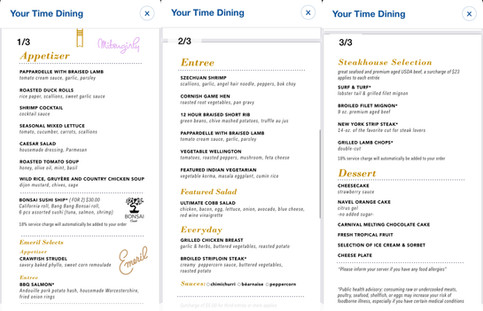
Ok, for those of you that are just dying for menu's, I did manage to get a few of them for your viewing pleasure. Hopefully these will be big enough to read and expand to see.


Some of the Main Dining Room Menus:




bottom of page